
Generative UI Development
Generative UI development is the practice of using AI systems to draft, assemble, and refine user interfaces from intent — prompts, specs, design tokens, and product constraints — while humans retain ownership of quality, accessibility, and product judgment. It is not “AI builds the whole app while you watch.” It is a new production model: accelerate the boring parts of UI work, enforce design-system consistency earlier, and ship interfaces faster without abandoning engineering standards.
This guide explains what generative UI development is, how it works in real product teams, a practical end-to-end workflow, the stack and guardrails you need, common failure modes, and how EddyTools helps teams adopt it for production SaaS and Industry 4.0 products.
What Is Generative UI Development?
Traditional UI development starts with designs or wireframes, then engineers translate those into components, states, and responsive behavior. Generative UI development inserts AI into that pipeline so that a structured description of intent can produce candidate layouts, components, and interaction patterns in minutes instead of days.
Intent in, interface out
The input is rarely a vague sentence alone. High-performing teams feed models with product context: user role, job-to-be-done, acceptance criteria, design tokens, component inventory, and constraints (“must use existing Button and Table primitives,” “WCAG 2.2 AA,” “mobile-first”). The output is draft UI code or a structured UI tree that maps onto your design system.
What it is not
Generative UI is not a replacement for product discovery, information architecture, or brand. It does not magically invent domain correctness for complex industrial workflows. Used poorly, it creates UI debt at machine speed. Used well, it compresses the distance between a validated idea and a reviewable interface.
Why Generative UI Matters Now
Product teams face rising expectations: more personalized experiences, more variants for experiments, and faster iteration cycles. Hiring more frontend capacity is expensive. Generative UI helps lean teams produce more interface options, keep experiments moving, and reserve senior engineering time for systems that actually need deep craft — performance, complex state, and domain-critical flows.
Speed without abandoning systems
The breakthrough is not raw generation speed. It is generation inside constraints. When AI is wired to your tokens, components, and lint rules, you get drafts that look like your product — not random “AI SaaS” aesthetics. That is the difference between a demo and a delivery pipeline.
Fit for SaaS and Industry 4.0 products
For EddyTools-style work — AI SaaS modules, operator dashboards, agent control planes, and plant-facing tools — generative UI is especially useful for admin screens, CRUD patterns, empty states, settings panels, and report views. These surfaces are numerous and pattern-heavy. Generative workflows shine there while humans focus on safety-critical interactions and domain UX.
How Generative UI Development Works
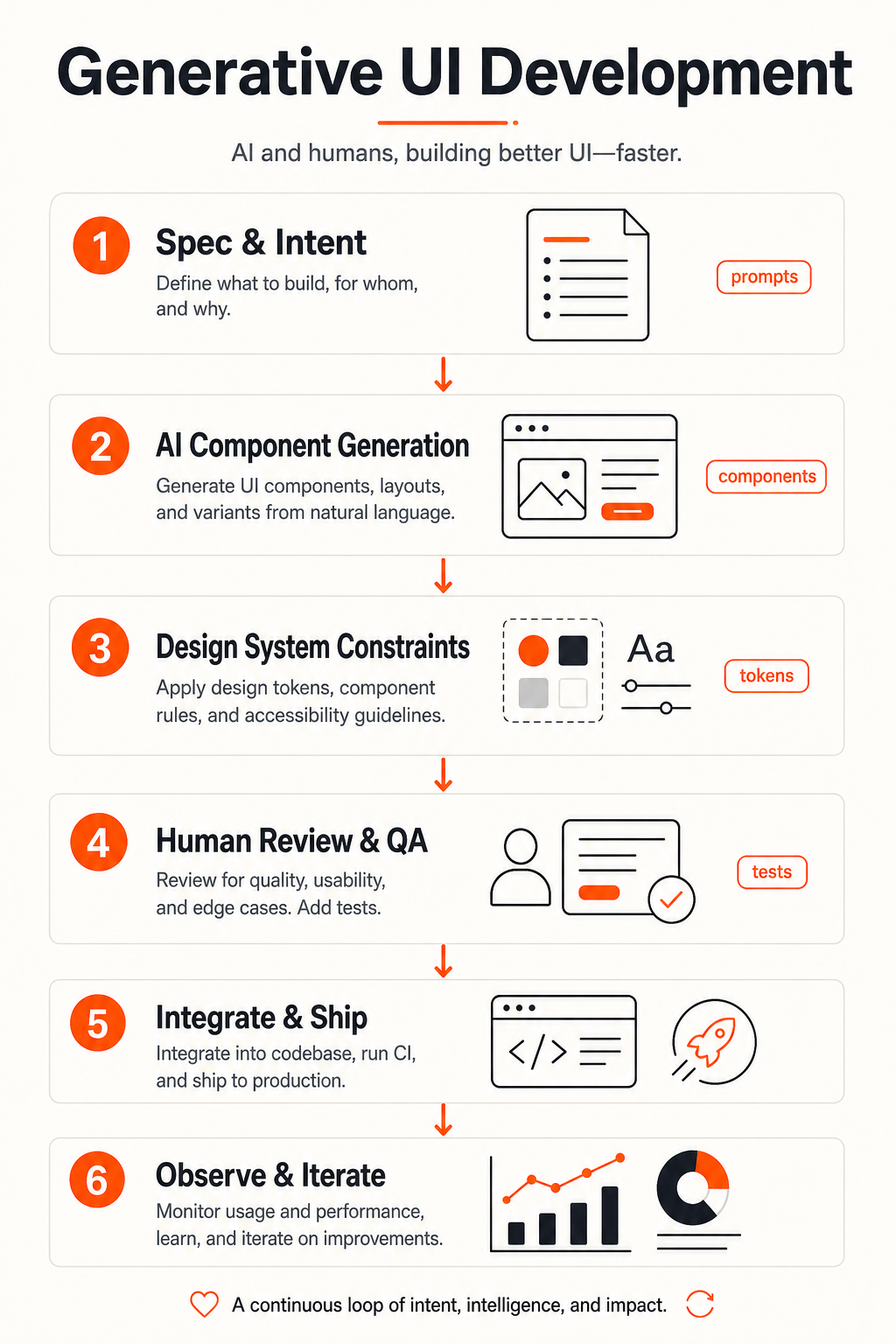
Most production setups follow a loop similar to the infographic above.
1. Spec and intent
Capture the job, user, constraints, and success criteria. Good specs beat clever prompts. Include edge cases: loading, empty, error, and permission-denied states. If the feature touches APIs, reference contracts or mock payloads.
2. AI component generation
Models propose layouts and compose components. Advanced setups use retrieval over your component library so the model prefers existing primitives. Some teams generate intermediate UI schemas (JSON trees) then compile them into React/Vue code for better control.
3. Design-system constraints
Tokens for color, spacing, typography, and radius act as hard rails. Component catalogs and Storybook docs provide the vocabulary. Without this layer, generative UI drifts into inconsistent one-off widgets.
4. Human review and QA
Designers and engineers review for usability, accessibility, and brand. Automated checks catch contrast issues, missing labels, and snapshot diffs. Human review remains mandatory for anything customer-facing.
5. Integrate and ship
Wire data, routing, auth, analytics, and feature flags. Treat generated UI like any other PR: tests, code review, staged rollout. Generation accelerates drafting — shipping still requires engineering discipline.
6. Observe and iterate
Watch activation, task completion, and error rates. Feed learnings back into prompts, templates, and component guidance so the next generation cycle starts smarter.
A Practical Stack for Generative UI
Design system and tokens
Start with a coherent design system — even a lean one. Document components with usage rules. Export tokens in a machine-readable form. The clearer your system, the less cleanup generative output needs.
Prompt and template libraries
Codify repeating UI jobs: “settings page with tabs,” “filterable table with bulk actions,” “onboarding checklist.” Templates reduce variance and make outputs reviewable against a known pattern.
Codegen, linting, and tests
Run generated code through formatters, ESLint/a11y rules, unit tests, and visual regression. If a draft fails checks, regenerate or patch before humans spend time on cosmetics.
Agent orchestration (optional but powerful)
Some teams use multi-agent workflows: one agent drafts UI, another checks a11y, another writes stories/tests. Orchestration is where generative UI becomes an operating system for frontend delivery rather than a chat experiment.
Best Practices That Separate Demos from Production
- Constraint first: Always generate against your design system, not a blank canvas.
- State coverage: Require loading, empty, error, and permission states in every generation brief.
- Accessibility as a gate: Do not merge without keyboard and screen-reader sanity checks.
- Own the architecture: AI can propose; humans decide routing, data boundaries, and performance budgets.
- Measure cycle time: Track time from brief to merged UI. That is the KPI that justifies the investment.
Common Pitfalls to Avoid
Pretty garbage
UI that looks fine in a screenshot but breaks with real data, long strings, or localization. Always test with messy production-like content.
Design-system drift
One-off styles and custom components accumulate when constraints are weak. Ban raw hex values and freehand CSS unless explicitly approved.
Skipping domain UX
For Industry 4.0 and agentic products, wrong defaults can create operational risk. Generative UI should accelerate scaffolding — not invent safety-critical flows without expert review.
Where Generative UI Creates the Most Value
High ROI surfaces include internal tools, admin consoles, CRUD modules, onboarding, marketing landing sections mapped to a component kit, and rapid A/B variants. Lower ROI (at least initially) includes novel brand-defining experiences and highly bespoke visualizations — unless you invest heavily in specialized generators and review.
How EddyTools Approaches Generative UI Development
EddyTools builds AI-assisted product systems for teams shipping agents, AI SaaS, and Industry 4.0 software. For generative UI, that usually means:
- Standing up or tightening a design system usable by AI tooling
- Wiring generation into your component inventory and tokens
- Adding review gates, tests, and CI checks
- Integrating UI generation into agentic delivery workflows
- Shipping production screens for SaaS and operator products — not demos
The goal is measurable: shorter UI cycle time, fewer design-engineering translation bugs, and a frontend team that spends more time on high-leverage product problems.
Getting Started in 30 Days
Week 1: Inventory and constraints
Catalog components and tokens. Pick one product area with repetitive UI. Define success metrics.
Week 2: Pilot generation
Generate three screens from structured briefs. Review with design and engineering. Log failure modes.
Week 3: Harden the pipeline
Add lint/a11y gates, story generation, and PR templates. Codify prompts that worked.
Week 4: Expand with ownership
Roll to a second squad, document the operating model, and decide what stays human-first.
Governance, Security, and IP Considerations
Generative UI introduces new governance questions. What data enters prompts? Do screenshots of customer environments leave your boundary? Who owns generated code under your vendor agreements? Treat UI generation like any other AI feature in the SDLC: minimize sensitive inputs, prefer private or enterprise model endpoints when needed, and keep an audit trail of briefs, model versions, and merged diffs.
Review gates that actually protect quality
Define merge blockers clearly: failed a11y lint, missing stories for new components, visual regression beyond threshold, or unapproved custom CSS. Automation should catch the mechanical issues so human review focuses on product sense — clarity of the workflow, cognitive load for operators, and consistency with the rest of the product.
Measuring ROI of Generative UI
Do not measure success by “number of screens generated.” Measure delivery outcomes: median hours from accepted brief to merged UI, percentage of generated PRs that pass CI on first try, design-system compliance rate, escaped defects after release, and experiment throughput. Pair those with qualitative signals from designers and engineers — if the team spends less time fighting boilerplate and more time on hard UX, the system is working.
Conclusion
Generative UI development is becoming part of how modern product teams ship. The winners will not be the teams that generate the most screens — they will be the teams that generate inside strong systems, review with discipline, and integrate AI into a reliable delivery loop.
If you want generative UI that respects your design system and ships to production, EddyTools can help you design the workflow, build the constraints, and deliver the first production screens.
Ready to build generative UI for your product?
Request a service consultation — we will map your design system, recommend a generative UI pipeline, and outline a pilot you can ship in weeks.