Building Multi-Agent Systems for Business Operations
Building Multi-Agent Systems for Business Operations — orchestrate AI agents for finance, ops, and customer workflows with guardrails and measurable ROI.
By Eddy Tools Team · Editorial team
Published 5 min read
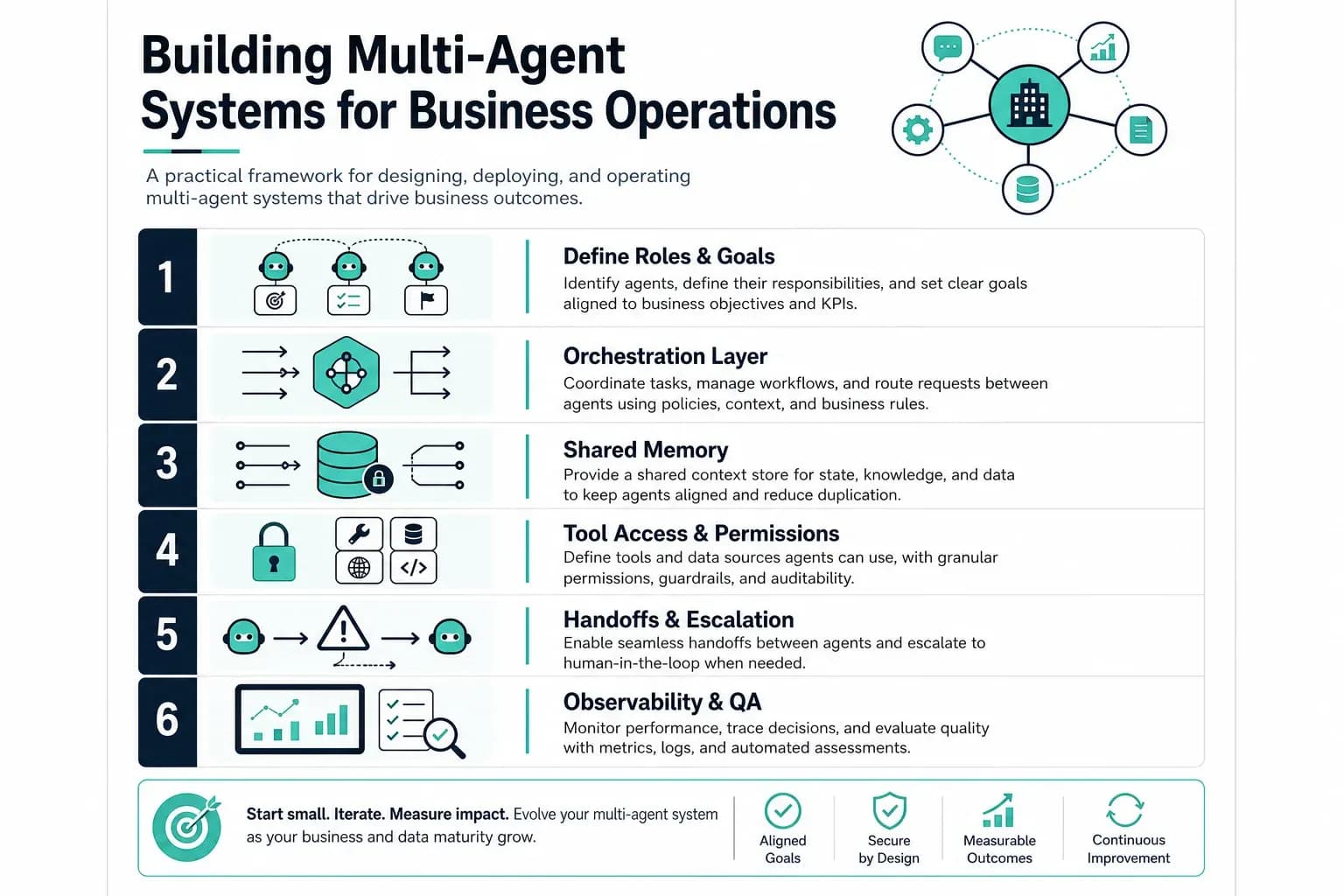
Building Multi-Agent Systems for Business Operations
Building multi-agent systems for business operations is how modern teams move beyond single chatbots and into coordinated AI workflows that handle research, routing, approvals, and execution across finance, customer support, sales ops, and internal tooling. A multi-agent system is not a pile of disconnected prompts. It is an orchestrated set of specialized agents with clear roles, shared context, guardrails, and measurable handoffs between steps.
This guide explains what multi-agent business systems are, why they matter for operations leaders, the architecture patterns that work in production, a practical deployment playbook, governance controls, and how to measure ROI. You will leave with a framework you can map to your own workflows — not a demo that breaks the moment real data shows up.

Building Multi-Agent Systems for Business Operations — from workflow mapping to orchestration, guardrails, and production ship.
What Is a Multi-Agent System in Business Operations?
In business operations, a multi-agent system is a coordinated network of AI agents where each agent owns a narrow job: triage an inbound request, pull data from CRM or ERP, draft a response, run a compliance check, or trigger an action in a downstream system. An orchestrator (or supervisor agent) decides which specialist runs next, what context passes forward, and when to stop or escalate to a human.
Single agent vs multi-agent
A single general-purpose agent can answer questions, but it struggles with long operational chains, tool sprawl, and accountability. Multi-agent designs trade one giant prompt for modular specialists: a research agent, a policy agent, an action agent, and a reviewer. Each module is easier to test, monitor, and improve without breaking the whole system.
Why Building Multi-Agent Systems for Business Operations Matters Now
Operations workloads are cross-functional. A customer escalation touches support history, billing, and product telemetry. Traditional automation handles fixed rules well but fails on ambiguity. Multi-agent systems sit in the middle: more flexible than brittle scripts, more controllable than one omniscient model. Teams adopt them to compress cycle time on repetitive decision chains while keeping humans in the loop for high-risk steps.
Architecture Patterns for Production Multi-Agent Workflows
Most production systems combine a few recurring patterns. Pick patterns based on latency, audit requirements, and how often humans must approve actions.
Supervisor orchestration
A supervisor agent reads the task state and routes work to specialists. This is the default for operational queues where steps are sequential but not always predictable. Supervisors should log routing decisions so you can debug misfires without guessing.
Tool-first action agents and shared state
Action agents should call typed tools (APIs, ticket updates) instead of hallucinating side effects in prose. Operational agents also need durable state — case IDs, SLA clocks, prior approvals — in a structured workflow record, not chat history alone.
How to Design and Deploy Multi-Agent Operations
Follow a delivery loop that mirrors the infographic framework: map the workflow, define agent roles, wire orchestration, add guardrails, integrate systems, pilot, then scale.
1. Map the operational workflow
Start with one painful workflow that happens weekly and has clear inputs and outputs. Document systems touched, approval points, failure modes, and compliance constraints. If you cannot draw the workflow on a whiteboard, agents will not fix the ambiguity.
2. Define agent roles and boundaries
Assign each agent a single responsibility and explicit out-of-scope rules. Example roles: intake classifier, context fetcher, policy checker, response drafter, action executor, auditor. Boundaries prevent agents from improvising each other’s jobs.
3. Pilot with review gates
Wire routing, timeouts, and structured logs per step. Run shadow mode first — agents propose, humans approve — then expand to partial automation on low-risk branches when metrics justify it.
Governance, Safety, and Human-in-the-Loop Controls
Multi-agent systems multiply capability and also multiply failure surface area. Governance is not optional for business operations.
Permission tiers and action classes
Classify actions as read-only, draft-only, or execute. High-impact executes — refunds, contract changes, production config — require human approval or dual control. Encode tiers in tool policies, not prompt pleading.
Evaluation and data boundaries
Minimize sensitive data in prompts, scope retrieval indexes, and log access. Build golden datasets from historical cases and test routing whenever models or tools change — multi-agent systems regress silently without evals.
Measuring ROI of Multi-Agent Business Systems
Measure operational outcomes, not demo applause. Useful KPIs include median handle time, first-contact resolution, exception backlog reduction, cost per resolved case, SLA adherence, human override rate, and error escape rate after automation.
My Insights
After shipping multi-agent workflows for SaaS and industrial clients, the teams that succeed treat orchestration as product engineering — not prompt hacking. They invest early in state models, tool contracts, and approval UX. Start with one workflow, three to five agents, hard boundaries, and shadow mode. Expand only when routing accuracy and override rates prove the system earns trust.
Building multi-agent systems for business operations is a marathon of integration and governance. Favor platforms that expose observability, tool auth, and human-in-the-loop hooks without locking you into a single model vendor — your orchestration layer should outlive any one LLM release.
Frequently Asked Questions
What is the first step in building multi-agent systems for business operations?
Map one high-friction operational workflow end to end — systems, approvals, SLAs, and failure handling. Agent roles should fall out of that map. Skipping workflow clarity is the most common reason multi-agent pilots stall in demo purgatory.
How many agents should a business operations workflow use?
Most production v1 workflows run well with three to five specialists plus a supervisor. More agents mean more routing errors and harder debugging. Add agents when you have distinct skills, tools, or policy boundaries — not because a blog diagram looks impressive.
Do multi-agent systems replace RPA and traditional automation?
They complement automation. Keep deterministic RPA for stable, high-volume steps. Use multi-agent layers where rules break down: ambiguous tickets, cross-system research, and draft-and-review cycles. Hybrid designs usually outperform rip-and-replace strategies.
How do you keep multi-agent workflows safe in enterprise?
Enforce permission tiers, typed tools, audit logs, human approval on execute-class actions, and continuous evals on historical cases. Security reviews should cover data scopes and third-party model policies the same way you review any production microservice.
What stack do teams use to orchestrate business agents?
Teams combine an orchestration framework, a workflow state store, tool integrations to CRM/ERP/helpdesk APIs, observability, and an eval pipeline. Model choice matters less than integration quality, routing logic, and operational visibility once you are past prototype.
Ready to orchestrate multi-agent operations in production?
Request a service consultation — we will map your workflows, design agent roles and guardrails, and outline a pilot you can ship in weeks.
Request a Service Consultation Explore Services App Development
Editorial note: Eddy Tools is an AI development and consulting company. Articles are written by the Eddy Tools editorial team and may mention our own services and the tools we build with.
Want help putting this into practice?
Book an architecture review and we will map it onto your workflows.
Keep reading

From POC to Production: Shipping AI Features
From POC to production: why AI demos stall, a four-gate sequence for shipping AI features safely, and the signals that mean you should kill the project instead.
Aug 14, 2026 · 7 min read

Building Operator Dashboards for AI Systems
Operator dashboards for AI systems: the four signal layers to instrument, what belongs on the screen, and the anti-patterns that turn a dashboard into wallpaper.
Aug 10, 2026 · 7 min read
AI Guardrails and Human-in-the-Loop Design
AI guardrails explained: a three-layer design for production AI agents — scope permissions, validate actions, and route the decisions that need a person.
Aug 7, 2026 · 7 min read