How to Deploy AI Agents Safely in Enterprise
Learn how to deploy AI agents safely in enterprise — a practical framework covering scoping, least-privilege permissions, human-in-the-loop, evaluation, and monitoring.
By Eddy Tools Team · Editorial team
Published 8 min read
Key takeaways
- Scope one high-value, low-blast-radius workflow before expanding the agent’s reach.
- Grant least-privilege permissions and gate irreversible actions behind human approval.
- Evaluate the agent against a realistic test set, then keep measuring in production.
- Treat monitoring, logging, and governance as launch requirements, not later add-ons.
To deploy AI agents safely in enterprise environments, start narrow, constrain what the agent can do, and keep a human accountable for consequential actions until evidence says otherwise. Safe deployment is less about the model you pick and more about the permissions, guardrails, evaluation, and monitoring you wrap around it. This guide is for engineering leaders, platform teams, and operations owners moving an agent from pilot to governed production.
An AI agent is software that uses a large language model (LLM) to plan and take actions across tools and systems, rather than only returning text. That autonomy is what makes agents useful and risky: a single misread instruction can trigger a database write, a customer email, or a refund. You will learn a practical framework for scoping the work, setting permissions, designing human oversight, evaluating readiness, and monitoring the agent once it is live.

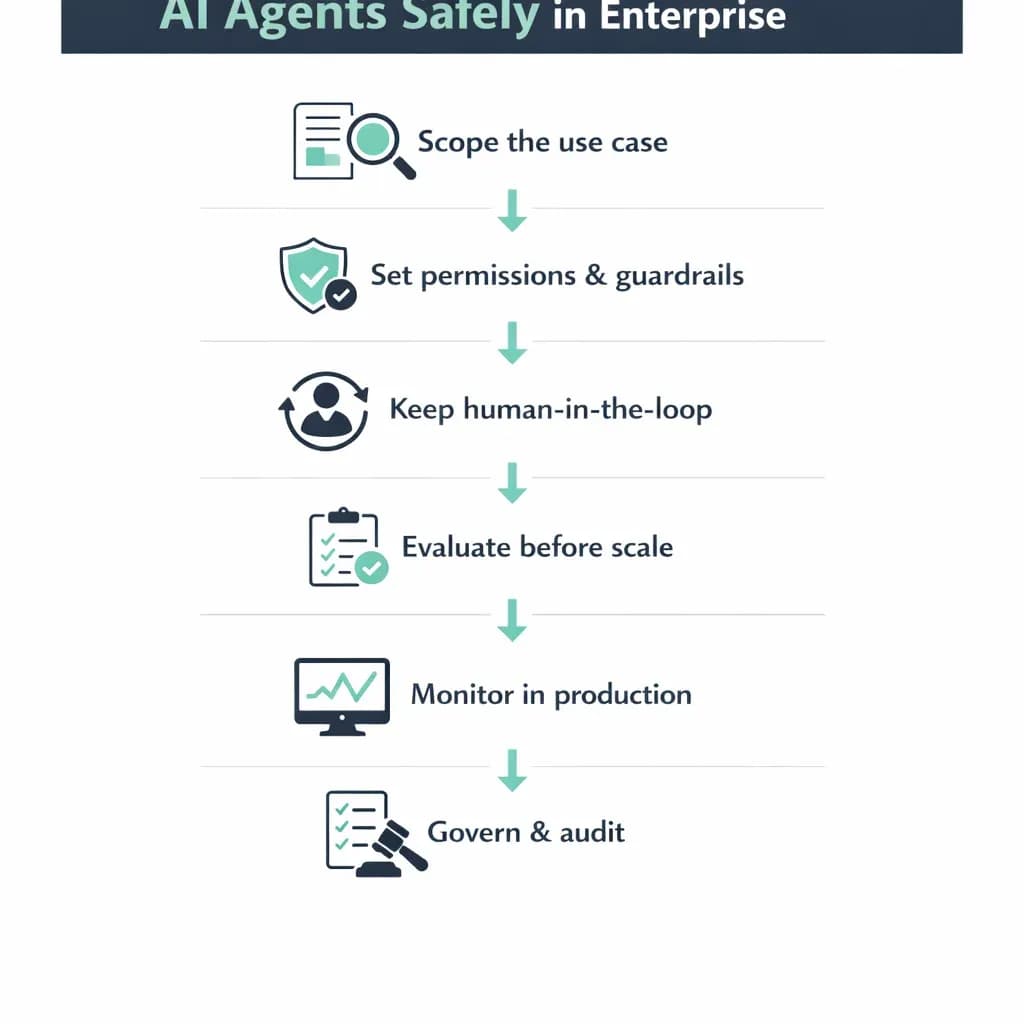
A six-step framework for safe enterprise AI agent deployment.
Why enterprise agent deployment carries real risk
Most agent pilots look impressive in a demo and fragile in production. The demo runs on clean inputs and a narrow path. Production brings ambiguous requests, malformed data, and edge cases no one scripted. When an agent has permission to act, those gaps stop being cosmetic and start touching systems of record.
Three risks matter most: incorrect actions (a plausible but wrong step, like updating the wrong account), prompt injection (hidden instructions in a document or web page hijacking the agent), and data exposure (an over-permissioned agent surfacing information a user should not see). None of these are reasons to avoid agents. They are reasons to deploy them with the discipline you would apply to any system that can change customer data.
A framework to deploy AI agents safely in enterprise
Safe deployment is a sequence, not a switch. Earn autonomy gradually: prove the agent is reliable on a small surface, then widen its permissions and remove human checkpoints only where the data supports it. The six steps below map to the framework in the infographic above.
Scope the use case tightly
Pick one workflow where the value is clear and the cost of a mistake is contained. Good early candidates are internal-facing and reversible: triaging tickets, drafting responses for review, or preparing data a person approves before it moves. Avoid launching first on anything that touches money, contracts, or external customers without a person in the loop. Write down what the agent may do, what it must never do, and what “good” looks like for a single run.
Set permissions and guardrails
Apply least privilege to every tool the agent can call. If it only needs to read a CRM and draft an email, it should not hold write access to billing. Scope tokens to the narrowest audience and shortest lifetime that works. Add guardrails at the tool boundary: validate arguments before execution, cap rate and spend, and refuse actions outside an allowlist. For agents that read untrusted content, isolate that content and never let retrieved text silently rewrite the agent’s instructions — this is where prompt injection is actually contained.
Keep a human in the loop
Human-in-the-loop means a person approves or can interrupt specific actions before they take effect. Reserve it for steps that are irreversible, expensive, or customer-facing: sending an external message, issuing a refund, deleting records. Design the approval to be fast and informative — show what the agent intends to do and why — so reviewers make good calls without becoming a bottleneck. As confidence grows, move low-risk steps to auto-approval and keep the checkpoint only where a mistake would be costly.
Evaluate before you scale
Evaluation is how you replace opinion with evidence. Build a test set from real historical cases, including the messy ones, and score the agent on task success, not just fluent output. Track how often it takes the correct action, asks for help appropriately, and avoids unsafe steps. Run these checks before every meaningful prompt or model change, because agents are sensitive to small edits. Offline tests will not catch everything, so evaluation continues after launch.
Monitor and govern in production
Log every action the agent takes, the inputs it saw, and the tools it called, so any outcome is traceable. Set alerts for anomalies — spikes in failures, unusual tool usage, or repeated retries — and define who responds when one fires. Governance closes the loop: assign an owner, keep an audit trail, and review incidents to tighten guardrails. Treat these as prerequisites for launch, not features you add after the first bad week.
Example: a support triage agent in a B2B SaaS company
Consider an illustrative mid-market SaaS company whose support team spends hours routing and summarizing inbound tickets. The team deploys an agent to read each new ticket, classify it, draft a suggested reply, and attach knowledge-base links. Crucially, the agent has read access to the help desk and knowledge base only — it cannot send anything. A specialist reviews the draft, edits if needed, and sends. The success metric is simple: share of drafts sent with minor or no edits, plus time saved per ticket.
After a few weeks, the team sees that routine password and billing drafts are accepted almost unchanged, while account-specific issues still need heavy edits. So they auto-approve the routine categories and keep human review on the rest. The blast radius stays small because the agent never had send permissions during the risky learning phase — prove reliability on a narrow surface, then expand autonomy only where the numbers justify it.
Risks, trade-offs, and when to wait
Agents add real overhead: evaluation infrastructure, monitoring, and someone accountable for the agent’s behavior. That only pays off when the workflow is frequent, valuable, and tolerant of occasional review. If the task is stable and deterministic, conventional automation is often cheaper and more reliable. Reserve agents for work that needs judgment across changing inputs.
Wait, or narrow the scope, when data quality is poor, when the process touches regulated data without clear safeguards, or when no one can own oversight. It is reasonable to run an agent in “suggest-only” mode for months before letting it act. A slower, governed rollout beats a fast launch that erodes trust after one visible failure.
My Insights
In production work, the teams that succeed with agents treat permissions as the real product decision. They spend more time on what the agent is allowed to touch than on prompt wording, because a well-scoped agent with a mediocre prompt is safe, while a brilliantly prompted agent with broad write access is a liability. Start every deployment by drawing the boundary of what can go wrong, then make that boundary small.
The second pattern that separates durable systems from demos is evaluation that never stops. Offline test suites drift the moment real usage changes, so the strongest teams pipe a sample of production runs back into review and adjust guardrails weekly. Autonomy should be something the agent earns metric by metric, not a setting you flip on launch day. It also helps to remember that most failures come from brittle connections to CRMs, help desks, and internal APIs — not from the model reasoning poorly — so invest in clean tool interfaces and logging first. Deploy AI agents safely in enterprise settings this way, and you get the productivity without betting the systems of record on a good demo.
Frequently Asked Questions
How do you deploy AI agents safely in enterprise environments?
Start with one narrow, reversible workflow, grant least-privilege access, and require human approval for any irreversible action. Evaluate the agent on realistic cases before scaling, then log and monitor every action in production. Widen autonomy only where measured reliability supports it, keeping guardrails on high-risk steps.
What is the difference between an AI agent and workflow automation?
Workflow automation follows fixed, predefined rules and is ideal for stable, deterministic steps. An AI agent uses an LLM to interpret changing inputs and decide which actions to take, which suits tasks needing judgment. Use automation when the path is predictable and an agent only when flexibility genuinely adds value.
How do you protect an agent against prompt injection?
Treat any content the agent reads as untrusted. Isolate retrieved text so it cannot overwrite the agent’s core instructions, validate every tool call against an allowlist, and keep permissions minimal so a hijacked agent still cannot do damage. Human approval on sensitive actions provides a final backstop.
How do you measure whether an agent is ready for production?
Build a test set from real historical cases and score task success — correct actions taken, unsafe steps avoided, and help requested when uncertain — not just readable output. Set a threshold you are comfortable with, run the checks before every change, and continue sampling production runs after launch to catch drift.
Should an enterprise agent ever act without human review?
Yes, but only for low-risk, reversible steps that have proven reliable in evaluation and monitoring. Keep human-in-the-loop for irreversible, expensive, or customer-facing actions. Move steps to auto-approval gradually as evidence accumulates, and be ready to reinstate review if monitoring flags a problem.
Ready to deploy AI agents safely in production?
Request a service consultation — we will map your requirements, recommend an approach, and outline a pilot you can ship in weeks with the guardrails, evaluation, and monitoring already built in.
Request a Service Consultation Explore Services App Development
Editorial note: Eddy Tools is an AI development and consulting company. Articles are written by the Eddy Tools editorial team and may mention our own services and the tools we build with.
Want help putting this into practice?
Book an architecture review and we will map it onto your workflows.
Keep reading

From POC to Production: Shipping AI Features
From POC to production: why AI demos stall, a four-gate sequence for shipping AI features safely, and the signals that mean you should kill the project instead.
Aug 14, 2026 · 7 min read

Building Operator Dashboards for AI Systems
Operator dashboards for AI systems: the four signal layers to instrument, what belongs on the screen, and the anti-patterns that turn a dashboard into wallpaper.
Aug 10, 2026 · 7 min read
AI Guardrails and Human-in-the-Loop Design
AI guardrails explained: a three-layer design for production AI agents — scope permissions, validate actions, and route the decisions that need a person.
Aug 7, 2026 · 7 min read